
The Plugins That Turn a Plain WordPress Site Into an Invention Showcase
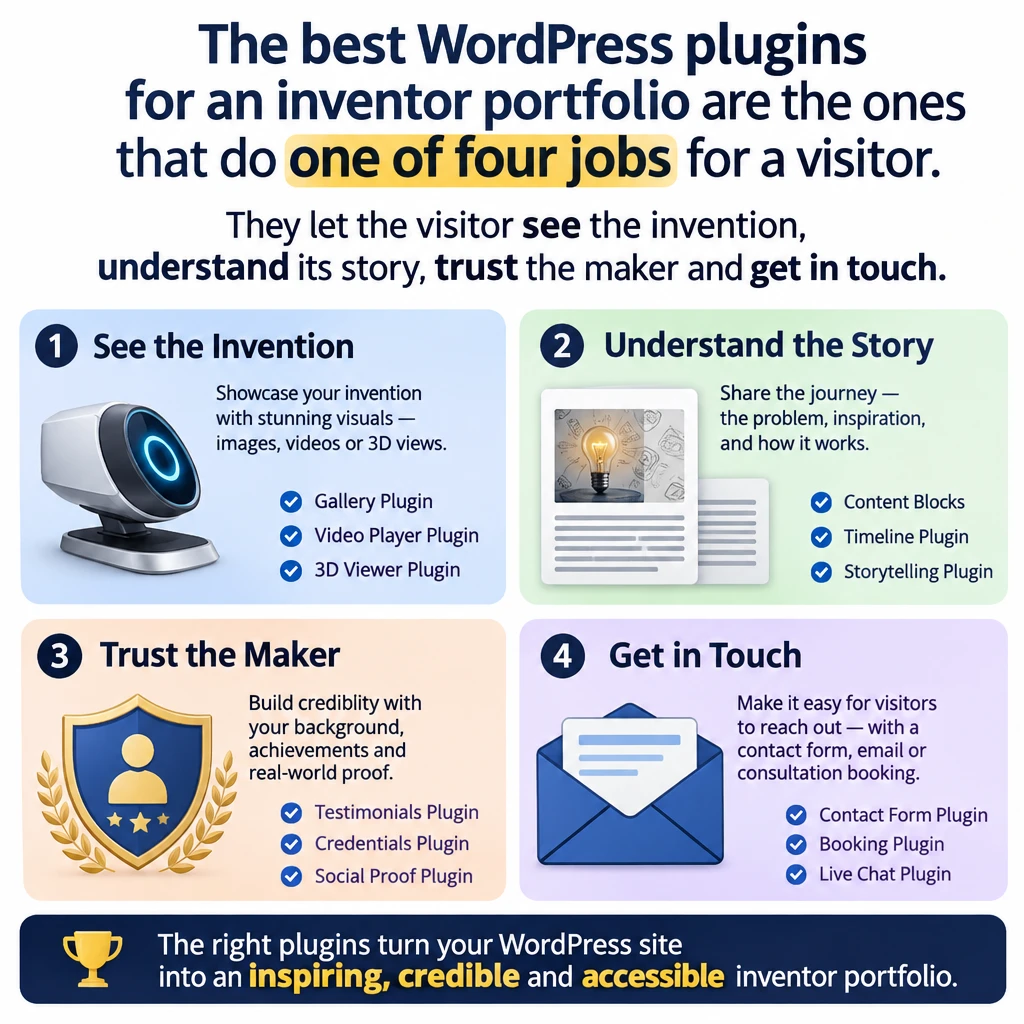
The best WordPress plugins for an inventor portfolio are the ones that do one of four jobs for a visitor. They let the visitor see the invention, understand its story, trust the maker and get in touch. Everything beyond those four jobs is optional, and some of it is clutter that slows the site down.
This article sorts plugins by those jobs instead of ranking them by popularity. It also covers what to keep off the site until your idea is protected, and why a short plugin list works better than a crowded dashboard.
Which plugins does an invention site need that a normal blog does not?
A blog asks people to read. An invention site asks them to look, watch and judge, usually within a few seconds. That changes what the site needs.
A blog can run happily on a theme, an SEO plugin and a comment filter. An invention site needs a good way to present images and video, a way to hide unfinished work, and a contact route that a collaborator will actually use. Those are the extra jobs, and each one maps to a plugin category.
Before you install anything, check what your theme and WordPress already do. The core editor has Gallery, Video, Cover, Columns and Details blocks, and it can save a layout as a synced pattern so every invention page looks the same. Many themes also ship their own galleries. A plugin that duplicates a feature you already own only adds weight.
So the question to ask of every plugin is simple. Which of the four visitor jobs does this serve? If you cannot answer, leave it in the plugin directory.
What shows a prototype at its best?
Seeing comes first, because nobody reads the story of a gadget they cannot picture. Three tools cover most of it.
Galleries. A gallery plugin such as Modula, Envira Gallery or FooGallery gives you grids, lightboxes and sensible image loading. A lightbox lets a visitor enlarge a photo of a hinge or a seam without leaving the page. If your theme’s built in gallery does this well, skip the plugin.
Video. Upload your demo to YouTube or Vimeo and paste the link into the editor. WordPress embeds it automatically. Video files are large, and hosting them on your own server is a quick way to make the whole site crawl.
Before and after sliders. These suit inventions with a visible change, such as a rough first print against the refined version, or a problem photographed with and without your fix. Search the plugin directory for “image comparison” or “before and after”, then read the recent reviews and the date of the last update before you commit.
The photography matters as much as the plugin. A few habits help.
- Shoot on a plain, uncluttered surface so the prototype is the only subject.
- Show scale with a hand, a coin or a ruler in at least one picture.
- Put one hero image at the top of each invention page and let the rest follow.
A prototype photographed next to a half eaten sandwich tells visitors a story, just not the one you meant. If your prototypes come from a 3D printer, the beginner’s guide to 3D printing prototypes for inventors covers how to get a print into a state worth photographing.
How do you tell the story of an invention instead of a bare list?
A list of features is a spec sheet. A story answers why the thing exists, what went wrong along the way and where it is going. Visitors remember the story and forget the spec sheet.
Here the best tools are mostly free ones you already have. Build one invention page layout and save it as a synced pattern, so every project follows the same order. A reliable order looks like this.
- The problem the invention addresses.
- The earlier versions and what each one taught you.
- The current prototype, with the hero image and video.
- What happens next.
Use the Details block to tuck technical depth behind a click. A curious engineer can open it, and a casual visitor can scroll past. If you want a visual history of versions, a timeline plugin can help, but a plain list of dated headings does the same job with nothing to maintain.
Telling the story as it unfolds also helps you find an audience before the invention is finished. The piece on how to build a community around your invention goes into that in detail.
Write each version of the story in your own words and from your own facts. Visitors can tell when a page is padded, and they leave.
How can other inventors and collaborators actually find and reach you?
Being found and being reachable are two separate problems, and each has a small plugin answer.
A contact form. WPForms Lite, Contact Form 7 and Fluent Forms all do the job. Pick one, keep the form to name, email and message, and test it by sending yourself a note from a different address. A form also keeps your email address off the page, where automated scrapers tend to collect it.
Spam control. Akismet filters spam from both comments and forms. If you plan to invite comments, which is a good way for inventors to meet, you need this before you open them.
An SEO plugin. Yoast SEO or Rank Math lets you set a clear page title and description for each invention. Install one of them, never both. They overlap, and two of them will quarrel over the same tags.
A newsletter signup. A tool such as MailPoet lets a visitor who is not ready to collaborate still follow your progress. This is optional, and it makes sense once you have something to send.
Trust sits in this section too. Visitors decide whether to contact you based on whether you look like a real person who finishes things. A short About page with a photo and a clear statement of what you make will do more for that than any plugin. Say only what is true, and let the work carry the rest.
What should stay hidden until the idea is protected?
In many countries, making an invention public before you file for protection can damage your ability to patent it. The rules differ by country and by type of protection, so talk to a qualified patent professional before you publish anything that reveals how your invention works. The article on intellectual property protection for independent inventors is a good place to start, and this section is general information and not legal advice.
As a cautious default, hold these back until you know where you stand.
- Drawings, CAD files and exploded diagrams.
- Photos or video that show the internal mechanism.
- Exact materials, dimensions and tolerances.
- Descriptions of the key trick that makes the invention work.
You can still show the finished outside, the problem it solves and the story around it. That gives visitors plenty to be excited about without handing over the mechanism.
WordPress gives you tools for the hiding part. Any post or page can be set to password protected or private from the visibility setting in the editor. That needs no plugin.
There is one catch. Files in your media library have web addresses, and anyone who has the direct address can open the file even if the post that contains it is locked. A password on a post does not always lock its images or documents. For anything truly secret, keep the file off the site altogether.
The setting that asks search engines not to index your site is a request, and not a lock. Treat it as a courtesy and nothing more.
Will the site stay fast and survive a bad day?
Image heavy sites get slow, and a slow site loses visitors before they reach the prototype. Four kinds of plugin keep that under control, and each has a job that is easy to name.
Image optimization. ShortPixel, Imagify and Smush compress photos when you upload them. Run your homepage through Google’s PageSpeed Insights, which is free, and see whether images are the main drag before you spend time on anything else.
Caching. A caching plugin such as WP Super Cache or LiteSpeed Cache stores ready made copies of your pages. Check your hosting plan first, because many hosts already include caching, and running two caches at once causes odd behaviour.
Backups. UpdraftPlus and Jetpack’s backup tool both save copies of the site on a schedule. Send the copies somewhere other than your own hosting account, so one failure does not take out both the site and the backup. Then restore a backup once on a test site, because a backup you have never restored is a guess.
Security. Wordfence and Solid Security add a firewall, login protection and scanning. Turn on two factor login, use a long unique password and keep WordPress, your theme and your plugins updated. Outdated plugins are a common way sites get broken into, which is another reason to keep the list short.
A bad day, whether a hack, a failed update or a deleted page, is survivable when you have a recent backup and a login nobody else can guess. Without both, it can end the site.
Which plugins can you safely skip, and how do you keep the pile small?
Most invention sites can skip the following.
- A second page builder on top of a theme that already has one. They fight each other and slow every page.
- Auto rotating homepage sliders. Visitors rarely wait for the third slide, and sliders add weight.
- Social feed widgets that pull in live posts. Link to your profiles instead.
- Popups that ask for an email address before the visitor has seen anything.
- Two plugins that do the same job, such as two SEO plugins or two caches.
A lean starting set covers every job in this article.
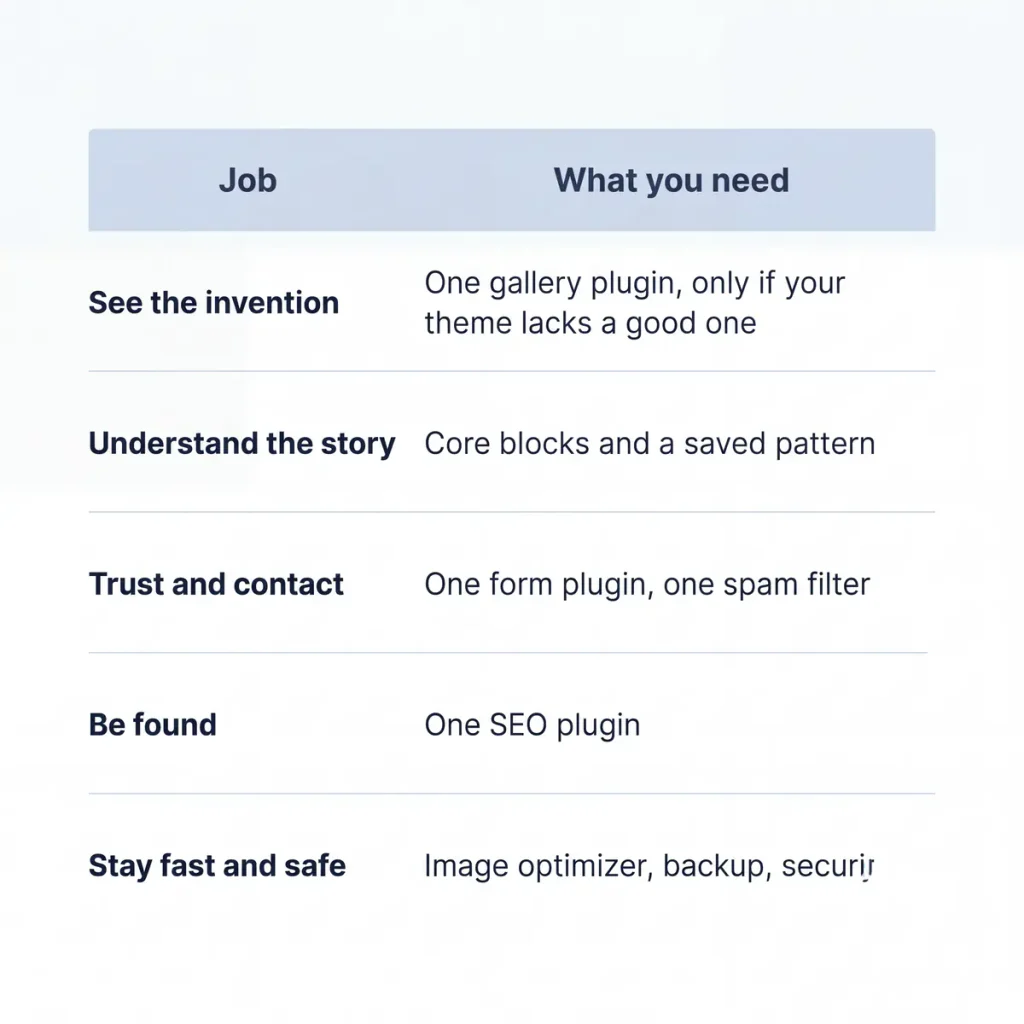
That is roughly six plugins, and you may need fewer.
Keep the list small with one habit. Before you install anything, write down which of the four jobs it serves. Once a month, delete any plugin you are not using. Deactivated plugins still sit on the server and still need updates. If a plugin does not do a job on the list, it does not belong on the site.
Team tools are a separate matter, and they are covered in the piece on productivity plugins for creative teams. Keep them away from the public face of your site.
Now over to you.
Leave a link to your own invention site in the comments, along with the one plugin you would not live without. Other inventors can then discover your work, and the rest of us can steal your plugin list… with credit, of course ☕

