
Productivity Plugins for Creative Teams Under Deadline
The Plugins Worth Installing When Your Creative Team Has a Deadline and Too Many Ideas
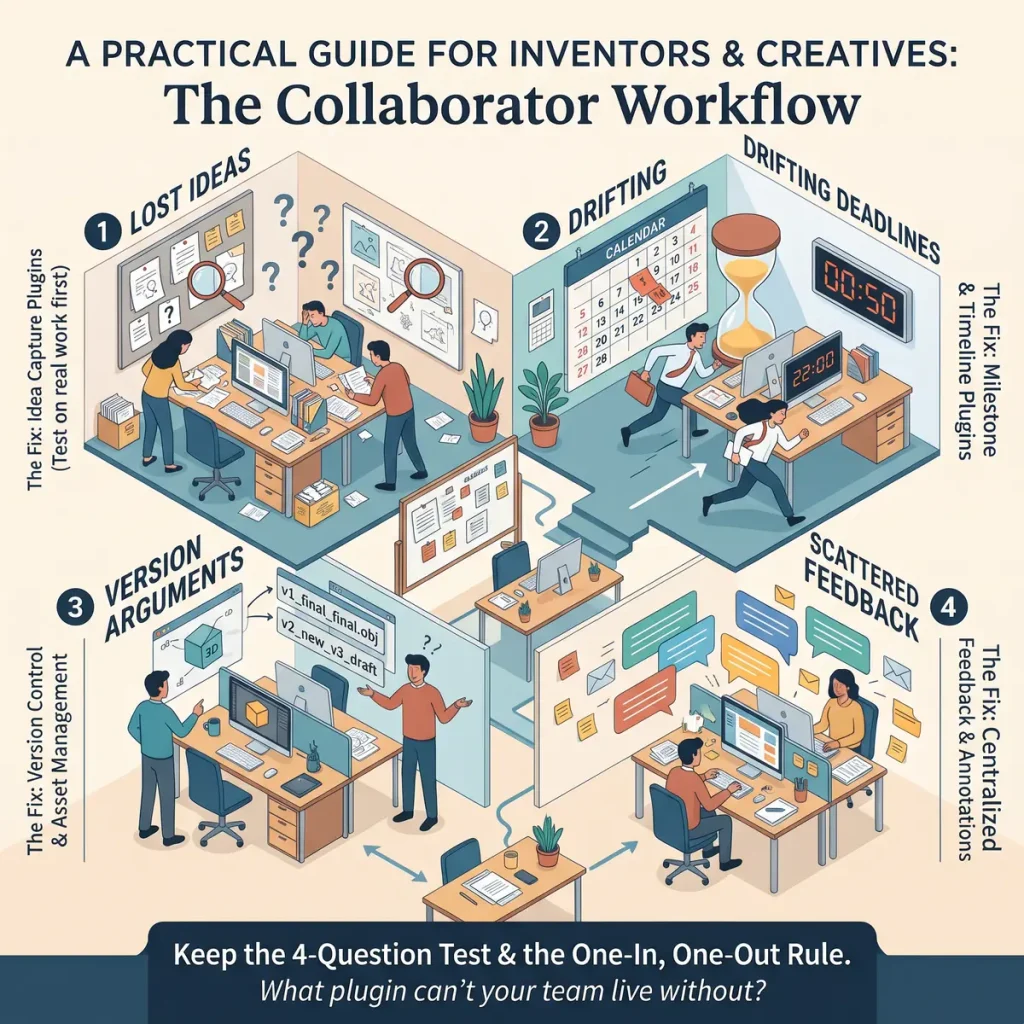
The best productivity plugins for creative teams are the ones that fix a bottleneck you can name: ideas that get lost, deadlines that drift, versions that multiply, or feedback that scatters. Pick one plugin per bottleneck, try it on real work, and remove anything that adds a task without taking one away.
This guide sorts plugins by the problem they solve instead of ranking them, and it names categories rather than brands. Brand names are better coming from inventors who use them daily, which is what the comments at the end are for.
Which plugins earn a place, and which just add clutter?
A plugin earns a place when it passes four questions. Ask them before you install anything, and ask them again when someone on the team says “I found this great new thing.”
- Can you name the bottleneck in one sentence? “We lose sketches after brainstorms” is a bottleneck. “We should be more organised” is a mood.
- Can everyone on the team use it within five minutes? A tool that needs a tutorial video and a support call before the first use will be abandoned by the person who most needs it, usually the one with the best ideas and the least patience for setup.
- Does it replace something, or only add something? If installing it means keeping the old method as well, you now have two places to look and have gained nothing.
- Does the work survive if one person leaves it? If only one teammate understands the setup, it is that person’s hobby, not the team’s system.
A plugin that fails any of these can still be useful to one person working alone. A team needs a higher standard, because every tool is a small agreement that everybody has to keep.
Run a trial before you commit. Choose one live piece of work, such as a prototype review or a pitch deck, and use the new plugin for all of it. If the team forgot it existed by Thursday, you have your answer.
Where do ideas go before they vanish? Plugins for capture
Ideas rarely arrive at a desk. They turn up while someone is washing dishes, waiting for a bus, or half asleep, and they are gone within minutes unless something catches them. Capture is a speed problem, so the test for this category is how quickly a thought can get in.
Three kinds of capture plugin are worth considering:
- Quick-note plugins that open in a single click or keystroke from any screen. If it takes more than a few seconds to start typing, the idea will not wait.
- Voice-to-text capture, for the moments your hands are busy with a soldering iron, a sketchbook or a toddler. Speaking a half-formed thought is often faster than writing it.
- Clipping tools that save a web page, an image or a snippet with a note attached. They suit the “this material would solve our hinge problem” kind of discovery.
Capture on its own creates a pile, though, and a pile of ideas is only slightly better than no ideas. Whichever plugin you use, give it one inbox that the whole team can see, and set a regular time to sort what landed there. Weekly works for most teams. Each item gets one of three fates: it becomes a task, it goes into an “incubating” list, or it is deleted without guilt.
The incubating list matters more than it sounds. Creative teams have more ideas than deadlines, and that is a good problem as long as the surplus has somewhere to wait. Otherwise the spark gets argued over in the middle of a sprint, which is the worst possible time.
If you are still working out which ideas deserve a team’s time at all, the starting point for turning an idea into a real invention collects wider resources for inventors, and it pairs well with a sorted inbox.
How do you keep a deadline honest when the project keeps shifting?
Creative projects change shape. A material fails, a collaborator has a better idea, a test result rearranges the whole plan. A deadline set in week one will often look foolish by week four, and the usual response is to stop looking at it. That is how deadlines drift: nobody moves them on purpose, they just stop being visible.
Plugins that keep deadlines honest fall into two groups.
Task board plugins show every piece of work as a card in a column such as “to do“, “in progress” and “done“. Their strength is that anyone can see in seconds what is stuck. Their weakness is that a board can grow to hundreds of cards, and then it hides what it was meant to show. Limit what sits in “in progress” to two or three items per person, and the board stays readable.
Calendar and reminder plugins attach dates to the work and tell people before a date arrives. The useful setting is a reminder midway to the deadline, not only on the day. Midway is when a team can still change something.
Whichever you pick, handle shifting scope with a simple habit: when the plan changes, change the date in the plugin on the same day, and write one line saying why. A deadline that moves with a stated reason is a plan. A deadline that quietly passes is a surprise for everyone on the team.
It also helps to separate two kinds of date. A fixed date comes from outside, such as a trade show, a grant application or a meeting with a manufacturer. A target date is your own estimate. Mark them differently in whatever tool you use, because when time runs short, target dates can flex and fixed dates cannot. Teams that treat both the same end up either panicking over estimates or ignoring real cut-offs.
What ends the “which version is final?” argument?
Anyone who has seen a file called “design_final_v3_REALLYfinal” knows this argument. Two people edit different copies, a third works from an old email attachment, and a meeting is spent working out whose drawing is the real one.
The fix is a single source of truth, and several kinds of plugin can provide it:
- Version history plugins record every saved change to a document and let you restore an earlier state. They make the “who changed this?” question answerable in seconds, without any blame being necessary.
- Shared-folder sync plugins keep one set of files identical across everyone’s devices, so there is only one “latest” copy.
- Naming and tagging helpers that stamp a status on a file, such as draft, in review or approved. The label carries information that a filename cannot.
Choose the one that matches how your team’s files actually behave. Text documents suit version history well. Large design files and 3D models often suit a synced folder with a clear status label. A mix is fine, provided each type of file has exactly one home.
The tool only works with a team rule alongside it: one named person approves “final“. Plugins keep records, but they cannot decide anything. If three people are allowed to declare a file final, you will still have three finals. Agree who holds that decision for each kind of work and write it at the top of the shared folder.
Keep the old versions rather than deleting them. Inventors in particular have a habit of discovering that the idea abandoned in March was exactly what the project needed in June, and version history makes that rescue a two-minute job…
How do you collect feedback without a twelve-thread email chain?
Feedback by email splits one conversation into many. One person replies to the whole group, another replies only to the sender, a third forwards it to someone outside the team, and the actual comments end up in four different places. Somebody then has to gather them by hand, and something always falls through the gaps.
Feedback plugins keep comments attached to the thing being discussed. Look for these types:
- Annotation and comment plugins that let a reviewer click on the exact spot in a drawing, page or prototype photo and leave a note there. “This corner” is clearer than “‘.”
- Shared-document comment threads, where each remark can be answered and marked resolved. A resolved flag tells everyone the point was dealt with, so the same note is not raised twice.
- Short survey or poll plugins, which suit questions with a limited set of answers, such as “which of these three handle shapes feels best?” They give you a count instead of an argument.
The plugin cannot make feedback useful by itself, so set two rules around it. First, ask reviewers a specific question: “Is the hinge placement a problem?” produces better answers than “Thoughts?” Second, give feedback a closing date. Open-ended review periods let comments trickle in until the day you need to ship, and the last comment is always the one that wants a redesign.
Creative teams also need to protect the spark during review. Early-stage ideas are fragile, and a flood of critique can end them before they have been tried. A practical approach is to separate rounds: one round for “what is promising here?” and a later round for “what will break?” Most comment tools can handle this with a simple label on each remark.
When has the plugin pile got too tall? A one-in, one-out rule
Plugins collect the way tools do in a garage. Each one made sense when it arrived, and a year later nobody can say what half of them do. A crowded toolkit has a real cost: every tool needs logins, updates and someone who remembers how it works, and every extra place to look for information is another place to miss it.
The simplest defence is a one-in, one-out rule. When the team wants to add a plugin, it must nominate one to remove. Nothing is added unless something leaves. This forces the comparison that the four questions earlier begin: is the new tool better than the one it would replace, or only newer?
Add a short review to the rule. Every quarter, the team goes through its list and asks of each plugin:
- Did anyone open it in the last month?
- Does it still solve the bottleneck it was installed for?
- Has another tool taken over its job?
Anything that gets three “no” answers goes. Export what you need to keep first, and tell the team where it went.
A sensible size for a small team is one plugin per bottleneck, so around four: one for capture, one for deadlines, one for versions, one for feedback. A team that has more than that usually has overlap, and overlap is where information goes missing.
Over to you
Every team’s setup is a little different, and the plugin that rescued one team may bore another. If you work with collaborators, tell us in the comments: which one plugin could your team not live without, and what did it save you from? Name the tool and the problem, so other inventors can borrow the idea.
I will be reading, probably with coffee ☕
Cross-referencing specs on Amazon
Parts-sourcing checklist on Amazon
Market Viability Test for Inventors on Amazon